

Embark on a journey through the realm of Microstation, a powerful software with a rich history and diverse functionalities that cater to various industries. From its inception to its modern-day applications, this guide delves into the intricate details of Microstation, offering a glimpse into its world of design and innovation.
Overview of Microstation
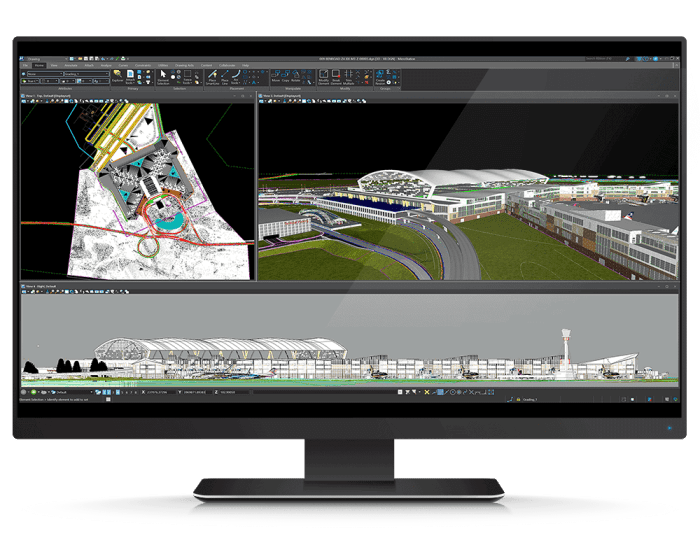
Microstation is a CAD software developed by Bentley Systems, initially released in the 1980s. Over the years, it has evolved into a comprehensive design and modeling tool used in various industries.
Key Features and Functionalities
- Microstation offers 2D and 3D design capabilities, allowing users to create detailed models and drawings.
- It supports a wide range of file formats, facilitating interoperability with other design software.
- The software includes tools for visualization, rendering, and animation, aiding in the communication of design ideas.
- Microstation features advanced parametric modeling tools for precise control over design elements.
- It supports collaborative work environments, enabling multiple users to work on projects simultaneously.
Industries Using Microstation
Microstation is commonly used in industries such as architecture, engineering, construction, and geospatial modeling. It is particularly popular in infrastructure projects, urban planning, and transportation design due to its robust features and capabilities.
Interface and Tools
Microstation offers a user-friendly interface with a wide range of tools to assist users in creating and editing designs efficiently.
User Interface
The Microstation interface consists of a menu bar, toolbars, and various palettes for easy access to tools and commands. Users can customize the interface to suit their preferences, allowing for a personalized workspace.
Main Tools
- The drawing tools in Microstation allow users to create lines, shapes, and text with precision.
- The modification tools enable users to manipulate and edit elements in the design, such as moving, rotating, and scaling objects.
- The annotation tools allow users to add dimensions, labels, and other annotations to the design for clarity and documentation.
- The visualization tools provide options for viewing the design in different modes, such as wireframe, hidden line, and rendered views.
Comparison with Other Software
When compared to other similar software like AutoCAD, Microstation offers a more streamlined interface with a focus on precision and accuracy. While both tools have similar functionalities, Microstation is preferred by some users for its ease of use and customizable interface.
Drawing and Design Capabilities
Microstation offers a wide range of drawing and design capabilities for both 2D and 3D modeling, making it a versatile tool for various engineering and architectural projects.
2D Modeling Features
- Microstation provides precise tools for creating detailed 2D drawings, including lines, arcs, circles, and text.
- The software allows for accurate dimensioning and annotation of 2D designs, ensuring clarity and professionalism in technical drawings.
- Users can easily manipulate and edit 2D geometry to modify designs quickly and efficiently.
3D Modeling Features
- Microstation enables users to create complex 3D models with advanced tools for extruding, revolving, and sweeping 2D shapes into 3D objects.
- It offers parametric modeling capabilities, allowing for the creation of intelligent 3D models that can be easily modified and updated.
- Users can apply materials, textures, and lighting effects to 3D models to enhance visualizations and presentations.
Examples of Complex Designs
One notable example of a complex design created using Microstation is the Burj Khalifa in Dubai, the tallest building in the world. Architects and engineers utilized Microstation's powerful 3D modeling features to design and visualize the intricate structure of the skyscraper.
Another example is the Forth Road Bridge in Scotland, where Microstation was instrumental in creating detailed 2D drawings and 3D models for the construction of the iconic bridge.
Customization and Configuration
When it comes to Microstation, customization and configuration play a crucial role in tailoring the software to meet specific project requirements and optimizing workflow efficiency.
Customizing Workspace
Customizing the workspace in Microstation allows users to create a personalized environment that suits their specific needs. This customization includes adjusting toolbars, menus, shortcuts, and workspace layout to streamline workflows and improve productivity.
Configuration Options
Microstation offers a wide range of configuration options that enable users to fine-tune the software according to their preferences. This includes setting up default units, coordinate systems, display settings, and file formats to align with project requirements and standards.
Optimizing Workflow
To optimize workflow in Microstation, users can utilize features like customizing keyboard shortcuts, creating macros for repetitive tasks, utilizing project templates, and setting up design libraries. By leveraging these tools effectively, users can enhance efficiency and productivity in their design projects.
Collaboration and Integration
Collaboration and integration are essential aspects of any design project, and Microstation offers various features to streamline these processes. By enabling team members to work together efficiently and integrating with other software seamlessly, Microstation enhances productivity and ensures smooth project workflows.
Facilitating Collaboration
- Microstation allows multiple users to work on the same design simultaneously, promoting real-time collaboration and communication.
- Users can easily share files, markups, and annotations within the software, facilitating feedback and review processes.
- The software provides version control and audit trail features, ensuring accountability and tracking changes made by team members.
Integration Capabilities
- Microstation offers interoperability with a wide range of software used in the AEC industry, such as AutoCAD, Revit, and Bentley products like OpenRoads and ProjectWise.
- Integration with GIS software allows for the seamless exchange of geospatial data, enabling accurate location-based design and analysis.
- Plugins and APIs further enhance integration possibilities, enabling customization and connectivity with other specialized tools and applications.
Best Practices for Data Exchange
- Standardize file formats and naming conventions to ensure consistency and compatibility when sharing data with team members using different software.
- Utilize Microstation's import/export functionalities to transfer data between different formats and applications without losing critical information.
- Regularly communicate with team members to establish clear workflows and protocols for data exchange, minimizing errors and ensuring data integrity.
Concluding Remarks
As we conclude our exploration of Microstation, we reflect on the versatility and collaborative nature of this software. With its customizable features and seamless integration capabilities, Microstation stands as a vital tool for design professionals across industries. Dive into the world of Microstation and unlock a realm of endless possibilities for your projects.
Essential FAQs
How can Microstation be customized for specific projects?
Microstation offers a range of customization options, including workspace configurations, tool settings, and interface adjustments, allowing users to tailor the software to meet their project requirements.
What industries commonly use Microstation?
Microstation is frequently utilized in industries such as architecture, engineering, construction, and geospatial technology for its robust design capabilities and versatile features.